

Free trial
1 MONTH
Try it forCHF 0.–30 days
- All features and modules for 1 month
- Manual switch to a subscription
- No credit card required
With Pay4All Age, your customers send their ID and/or a short 5-second selfie video directly from their smartphone via a QR code. Files are encrypted with AES-256-GCM before storage and are only visible from your WordPress order screen.
Ideal for alcohol, tobacco, CBD, knives, wine and spirits, e-cigarettes, or any other product subject to a legal age requirement.
Preview of the age-verification form shown to customers during checkout.
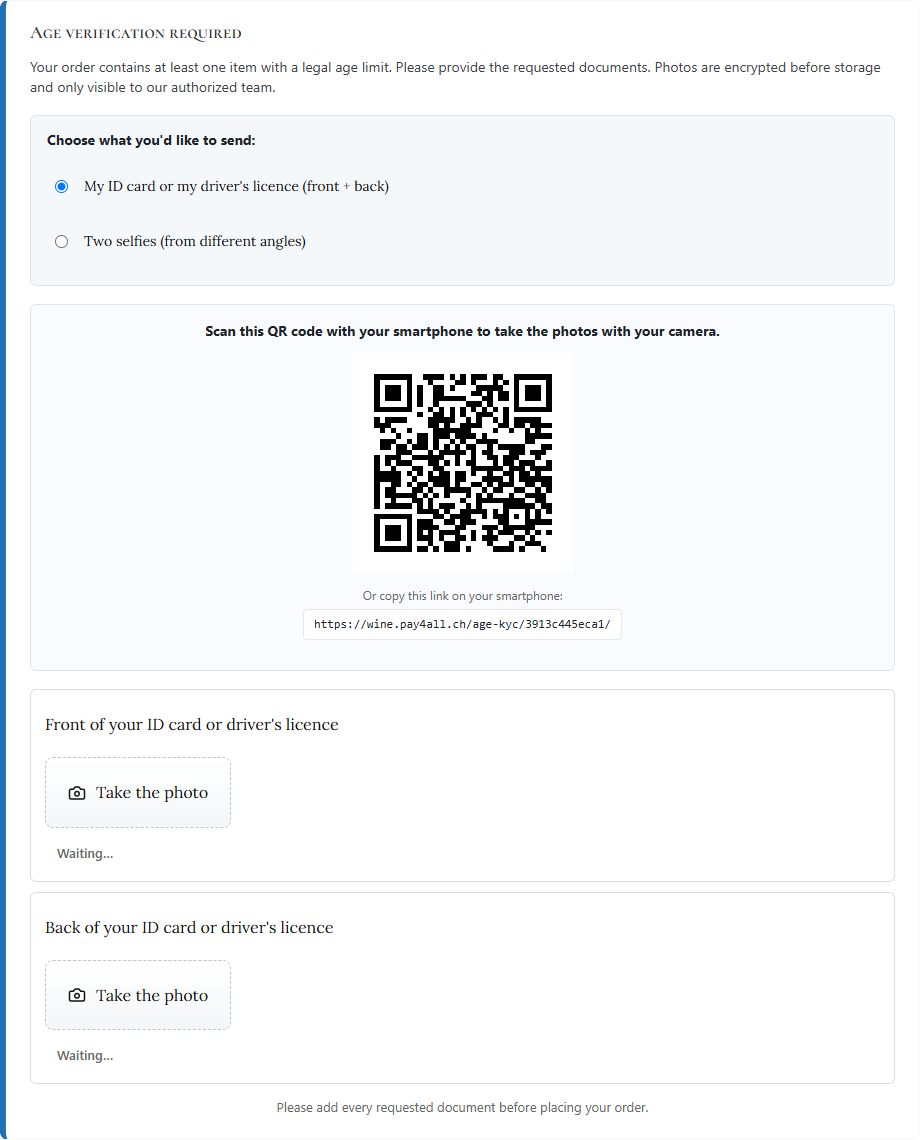
A clean, privacy-friendly age-verification layer connected directly to WooCommerce and/or Pay4All Shop.
A checkbox on each product page determines whether verification applies. Sell wine AND apple juice in the same store : only the relevant sale triggers the document request.
For every WooCommerce or Pay4All Shop order, a button lets you decrypt and open the photos in a new tab. They are never accessible without being logged in as an administrator.
The customer scans a QR code from their computer and continues on their smartphone. The camera is used directly, with no app to install. Photos appear in real time in the checkout open on the computer.
Title, description, slot labels, error message, and QR invitation — everything is translated into FR / DE / IT / EN and can be overridden by language from the admin area. Match the tone precisely to your brand.
You choose whether you want the ID document (front + back), a short 5-second selfie video (with embedded anti-fraud verification code), or both. Configurable in one click from the plugin settings.
For every order, a random 4-digit code is generated by your server and automatically stamped into a corner of every captured photo and video. The code is never shown to the customer : it appears only in the final files, and you find it as a reference on the order screen to verify at a glance that the capture was really taken in real time and is not an old file being reused.
Photos and video can only be sent through the smartphone (or tablet) camera. On a computer without a camera or when resending from a PC, the upload buttons disappear : the customer has to scan the QR code and take the documents with their phone. Impossible to re-upload an old file stored on disk.
Tested with the classic WooCommerce checkout, Checkout Blocks (React), and the checkout widgets from Elementor Pro and Divi. A DOM observer ensures the panel appears even when the theme dynamically rewrites the page.
No third-party account and no data leaving your server.
A checkbox in the Product data panel of WooCommerce or Pay4All Shop. A shield badge in the product-list column lets you identify affected products at a glance.
A panel appears in the checkout. On mobile, the customer goes directly to camera capture ; on a computer, they scan a QR code with their smartphone. The “Next / Place order” button remains disabled until the required documents have been submitted.
On the order editing screen, an “Age verification” block displays the received slots with one button per photo. One click decrypts the image and opens it in a new tab. Automatic deletion can be configured for N days after the order is deleted.
Blurry, badly framed or suspicious photo ?
Tick the photos in question in the order lightbox and click “Ask the customer to resend the photos”. The customer receives an e-mail with a secure link (30 days) to retake only the requested photos from their smartphone. You are notified once and only once when everything has been resent.
No third-party service. No data sharing. Photos never leave your server.
Each photo is encrypted with AES-256-GCM using a per-order key derived with HMAC-SHA256. The master key is stored in an age.key file outside web-accessible directories (permissions 0600).
A 12-character hexadecimal token (48 bits of entropy) — TTL 20 minutes. The QR code contains a clean URL /age-kyc/<token>. No trace remains after the order is finalized.
You set the number of days (0 = never) for which photos are retained after the order is permanently deleted. A daily cron job removes what needs to be deleted — GDPR-friendly.
Pricing depends on the plugin used for your online store:
FREE avec Pay4All Shop.
SUBSCRIPTION with WooCommerce.
Try it forCHF 0.–30 days
CHF 9.–CHF 7.– per month / domain
CHF 90.–CHF 70.– per year / domain-22%
One license per domain.
Pay4All Shop is free in its basic version. Pay4All Pro unlocks all advanced Pay4All Shop features, including age verification.
A Pay4All Pro subscription is required for WooCommerce.
No. They are stored on your WordPress website, encrypted before being written, and can only be decrypted by you from the admin screen. No third-party service is called for recognition or analysis.
No — this is assisted capture, not automatic recognition. The plugin collects the photos and makes them available to you for human visual inspection.
The “Place order” button remains disabled and a blocking error appears. No order is finalized without photos. You can customize the error message from the admin area.
Yes. The plugin declares HPOS and Checkout Blocks compatibility when loading and has been tested with both WooCommerce storage models.
For as long as the order exists. After the order is permanently deleted, a configurable retention period triggers automatic deletion.
Existing photos become unreadable. A Download backup key button in the plugin settings lets you save the master key outside the server. This should be done during the initial installation.
Pay4All Shop is our own order-form plugin. To encourage adoption, we provide age verification to all its users with no separate subscription and no domain limit.
On WooCommerce, Pay4All Age remains a premium service with dedicated support and maintenance — CHF 7.–/month or CHF 70.–/year per domain after a one-month free trial. A single Pay4All license also covers Pay4All TWINT and Pay4All Stripe on the same domain.